:: THIS BLOG IS ONLY FOR MY NOTES...NOTHING SPECIAL...THANK YOU ::
Showing posts with label security. Show all posts

Saturday, November 23, 2013

xp-AntiSpy


The xp-AntiSpy is a little utility that lets you disable some built-in update and authentication ‘features’ in WindowsXP.
For example, there’s a service running in the background which is called ‘Automatic Updates’. I don’t know what this service transfers from my machine to other machines on the internet, especially the MS ones. So I play it safe and disable such functions. If you like, you can even disable these functions manually, by going through the System and checking or unchecking some checkboxes. This will take you approximately half an hour. But why wast time when a little neat utility can do the same in 1 minute? This utility was successfully tested by lots of users, and was found to disable all the known ‘Suspicious’ Functions in WindowsXP. It’s customiseable, but comes up with the Default settings, which are recommended. This utility is DONATIONWARE! This means, you don’t have to pay anything for this program and you can give it to anyone who’s interested in it, as long as you don’t sell it. If you find this tool useful and wanna give something back, think about donating a small amount of money.
Thanks.

How To Hide Drives From My Computer In Windows


NoDrives Manager is a free tiny tool that allows you hide drives from My Computer in Windows. It only hides the drives so you can still access them by typing the letter of the drive in run or Windows Explorer’s addressbar.

Friday, May 17, 2013

Registry Alert monitors


Registry Alert monitors the Windows Registry for unwanted modifications

Registry Alert is a freeware software. It help you to Protect your computer from spywares or from other software which start automatically on system start up and effect your computer performance. As default, it will monitor your start up registry keys, if it found any changes then it will give you a alert and allow you to stop those running processes. You can add specific registry key into 'Always remove list' after that it will automatically remove that registry key. You can add your own registry keys for monitoring.


APPADMIN

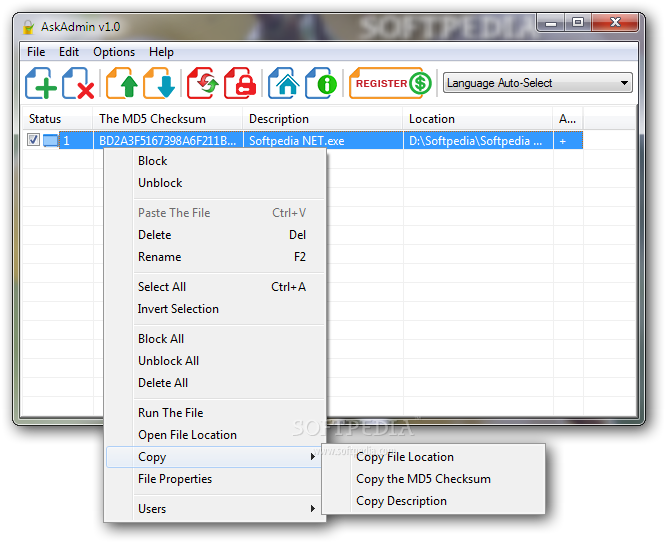
AskAdmin (formerly AppAdmin)
Block applications easily and effectively


Drag an drop an application and tick the box or select the application with Add button and then tick the box, finally Press the restart explorer button to block the desired applications.
The program uses the Hash method, therefore it's useless to change the banned application`s exe name. Quickly block any application using AskAdmin.

What's New in This Release:
· [Fixed] – Sometimes Drag and drop doesn’t work properly
· [Fixed] – Restart Windows explorer feature causes to UAC doesn’t warn for several applications
· General improvements


CAIN & ABEL


Cain & Abel is a password recovery tool for Microsoft Operating Systems. It allows easy recovery of various kind of passwords by sniffing the network, cracking encrypted passwords using Dictionary, Brute-Force and Cryptanalysis attacks, recording VoIP conversations, decoding scrambled passwords, recovering wireless network keys, revealing password boxes, uncovering cached passwords and analyzing routing protocols. The program does not exploit any software vulnerabilities or bugs that could not be fixed with little effort. It covers some security aspects/weakness present in protocol's standards, authentication methods and caching mechanisms; its main purpose is the simplified recovery of passwords and credentials from various sources, however it also ships some "non standard" utilities for Microsoft Windows users.

Cain & Abel has been developed in the hope that it will be useful for network administrators, teachers, security consultants/professionals, forensic staff, security software vendors, professional penetration tester and everyone else that plans to use it for ethical reasons. The author will not help or support any illegal activity done with this program. Be warned that there is the possibility that you will cause damages and/or loss of data using this software and that in no events shall the author be liable for such damages or loss of data. Please carefully read the License Agreement included in the program before using it.

The latest version is faster and contains a lot of new features like APR (Arp Poison Routing) which enables sniffing on switched LANs and Man-in-the-Middle attacks. The sniffer in this version can also analyze encrypted protocols such as SSH-1 and HTTPS, and contains filters to capture credentials from a wide range of authentication mechanisms. The new version also ships routing protocols authentication monitors and routes extractors, dictionary and brute-force crackers for all common hashing algorithms and for several specific authentications, password/hash calculators, cryptanalysis attacks, password decoders and some not so common utilities related to network and system security.


PROCESS HACKER

A free, powerful, multi-purpose tool that helps you monitor system resources,
debug software and detect malware.


DROIDSHEEP


DroidSheep.


Welcome at droidsheep.de

Maybe you heard about “DroidSheep” or “DroidSheep Guard” and your are looking for information about these apps.

DroidSheep [Root] is an Android app for Security analysis in wireless networks and capturing facebook, twitter, linkedin and other accounts.

DroidSheep Guard is another Android app for monitoring Androids ARP-table. It tries to detect ARP-Spoofing on the network, such as an attack by DroidSheep, FaceNiff and other software.

Please notice:
DroidSheep was developed as a tool for testing the security of your accounts and is based on my Bachelor thesis with title “Session Hijacking on Android Devices”. This software is neither made for using it in public networks, nor for hijacking any other persons account.
It should only demonstrate the poor security properties network connections without encryption have.

So do not get DroidSheep to harm anybody or use it in order to gain unauthorized access to any account you do not own! Use this software only for analyzing your own security!

INFOhttp://droidsheep.de/

Thursday, November 1, 2012

List of anti-malware product removal tools

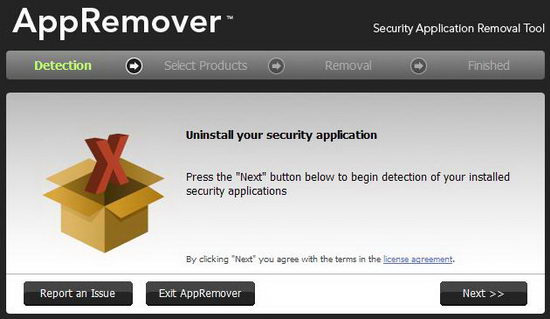
Anti-malware / Anti-Virus products often are not removed completely or properly when using “Programs and Features” (or “Add/Remove Programs”). It is possible that various services and/or drivers will still be active or installed, and will cause conflicts when another anti-malware product is installed. Therefore, you may have to use the manufacturer’s cleanup or removal tool to insure proper removal before you install Microsoft Security Essentials (MSE), or any other anti-malware product.


INFO : MICROSOFT 

UPDATE : MICROSOFT 

Wednesday, October 10, 2012

ESET SysInspector

ESET SysInspector is a free, state of the art diagnostic tool for Windows NT based systems. It peers into your operating system and captures details such as running processes, registry content, startup items and network connections.

Once a snapshot of the system is made, ESET SysInspector applies heuristics to assign a risk level for each object logged. Its intuitive graphical user interface enables the user to easily slice through the large volume of data using a slider to select objects of a particular color coded risk level for closer examination. ESET SysInspector is a convenient utility for the tool box of every IT expert and first responder.


DOWNLOAD : SYSINSPECTOR

Dr.Web LiveCD

If your Windows or Linux system has been rendered non-bootable by malware, restore it for FREE with Dr.Web LiveCD!

Dr.Web LiveCD will clean your computer of infected and suspicious files, help you copy important information to a removable data storage device or another computer, and then attempt to cure infected objects.This download is an ISO file which can be burned to CD/DVD.


DOWNLOAD : DRWEB

Microsoft Malicious Software Removal Tool

The Microsoft Windows Malicious Software Removal Tool checks Windows 7, Windows Vista, Windows XP, Windows 2000, and Windows Server 2003 computers for and helps remove infections by specific, prevalent malicious software—including Blaster, Sasser, and Mydoom. When the detection and removal process is complete, the tool displays a report describing the outcome, including which, if any, malicious software was detected and removed. The tool creates a log file named mrt.log in the %WINDIR%debug folder.

This tool will help to remove specific, prevalent malicious software from infected systems. Because computers can appear to function normally when infected, Microsoft advises you to run this tool even if your computer seems to be fine. In addition to using this tool, you should use an up-to-date antivirus product to help protect your computer from other malicious software.

This tool is not a replacement for an anti-virus product. To help protect your computer, you should use an anti-virus product.

The user must be an administrator to run this tool. This tool will not run on any version of Windows 98, Windows ME, or Windows NT 4.0.


DOWNLOAD : REMOVAL TOOL

Microsoft Security


This DVD5 ISO image file contains the security updates for Windows released on Windows Update in October 2012. The image does not contain security updates for other Microsoft products. This DVD5 ISO image is intended for administrators that need to download multiple individual language versions of each security update and that do not use an automated solution such as Windows Server Update Services (WSUS). You can use this ISO image to download multiple updates in all languages at the same time.

Important: Be sure to check the individual security bulletins at http://www.microsoft.com/technet/security prior to deployment of these updates to ensure that the files have not been updated at a later date.

Kaspersky Virus Removal Tool

The Kaspersky Virus Removal Tool application was designed to be another virus scanner and detection software from Kaspersky. The product will scan the specified locations for any virus threats and remove them or send to Quarantine folder.


DOWNLOAD : KASPERSKY


sysinternals suite

The Sysinternals Troubleshooting Utilities have been rolled up into a single Suite of tools. This file contains the individual troubleshooting tools and help files. It does not contain non-troubleshooting tools like the BSOD Screen Saver or NotMyFault.


DOWNLOAD : SYSINTERNALS